Yes, you can use affiliate links on YouTube right now, as long as you disclose them clearly. The fastest routes in are YouTube Shopping, if your channel qualifies, or joining a merchant program like Amazon or a broader affiliate network. Once you’re approved, generate a deep link to the exact product you’re recommending using the YouTube Description Generator: SEO-Ready Copy | AmmarAI, drop it in the top two lines of your description, and track the clicks. That’s the whole starting move. Everything else is optimization.
TL;DR:
- Affiliate links can generate higher earnings if placed at the top of descriptions and in pinned comments, as these are the most visible spots for viewers.
- Using deep links to exact products and appending UTM tags improves tracking accuracy and helps optimize which videos and placements produce the most revenue.
- Joining YouTube Shopping and Amazon programs requires eligibility, including being in a supported market, YouTube Partner status, and complying with specific category restrictions.
- Tracking cookie windows, which vary from 24 hours to 90 days, influences the urgency and style of your calls to action, since longer windows allow for more educational content.
- Disclosing affiliate links clearly in descriptions and in videos builds viewer trust and is legally necessary, with placement before the first link being most effective.
What Are Affiliate Links on YouTube and Who Can Use Them?
An affiliate link is just a tracked URL. It carries a unique ID that tells a merchant “this sale came from this creator,” triggers a cookie in the viewer’s browser, and pays you a commission when they buy, typically on a last-click basis. That means whoever gets the final click before checkout usually gets the credit, even if three other creators mentioned the same product earlier that week.
You don’t need YouTube’s permission to post an affiliate link. What varies is which programs you can access:
- Direct merchant programs: You apply straight to a brand (a software company, a skincare line) and get a unique tracking link.
- Affiliate networks: One application gives you access to hundreds of merchants at once, each with its own commission rate and cookie window.
- Platform integrations: YouTube Shopping’s affiliate program lets you tag products directly in your video, and it now includes Amazon.
Merchant and network links are open to almost any creator today. YouTube Shopping and its built-in Amazon tagging require YouTube Partner Program membership and availability in your market. This is the real fork in the road for beginners.
How Do You Join the YouTube Shopping Affiliate Program?
YouTube Shopping is the closest thing to a native affiliate program the platform offers, and it’s worth checking your eligibility before you go hunting for outside networks.
Eligibility, in plain terms:
- You need active YouTube Partner Program membership.
- Your channel needs to be in a supported market, since the program isn’t global yet.
- Certain channel categories are excluded, so review the current list in YouTube’s Shopping affiliate program overview before assuming you qualify.
Steps to enroll and start tagging:
- Open YouTube Studio and check the Earn tab for a Shopping affiliate program invitation or application option.
- Accept the terms and browse the seller list, which includes a wide range of major retail brands and merchants.
- Add products directly to a video, a Short, or a livestream using the product tagging tool.
- Check commission rates per product inside Studio before you tag, since they vary by seller and sometimes by campaign.
Statistic Callout: YouTube’s own documentation notes that some sellers run temporary incentive programs with boosted commission rates while the Shopping affiliate program stabilizes in a given market. If you catch one of these windows early, tagging the right products can pay meaningfully more than the standard rate for the same sale.
Once you’re in, plan content around those windows instead of tagging on autopilot. If a seller is running a higher payout period, build a video around that product category that week rather than three months later when the rate has reset. Bulk tagging also matters here: instead of manually adding products video by video, look for the option in Studio to apply the same product set across a batch of eligible uploads, which saves real time if you run a review-heavy channel with dozens of relevant older videos.
How Do You Get Affiliate Links From Amazon, Networks, and Merchants?
Amazon officially joined YouTube Shopping’s integration, which means eligible creators can now tag Amazon products directly and earn commissions without pasting raw Associates links into a description. That’s a real shift. Before this, creators had to manage Amazon links entirely outside YouTube’s tools, copying URLs by hand and hoping they didn’t break.
To connect Amazon, link your Amazon Associates or approved account to your YouTube channel through the Shopping affiliate settings in Studio, then browse the catalog the same way you would any other seller. For everything else, the process depends on the program type:
- Affiliate networks require you to apply once, then request access to individual merchants inside that network’s dashboard. Approval can take anywhere from a few hours to a couple of weeks depending on the merchant.
- Direct merchant programs mean applying straight to the brand, which often means faster approval but no centralized dashboard if you’re juggling ten different companies.
- Deep links point to the exact product page a viewer needs, not a generic homepage. Shopify’s guide to building affiliate links recommends this over broad category links because it removes friction between the click and the purchase.
Pro Tip: Always test a freshly generated affiliate link in a private or incognito window before publishing. Logged-in sessions can mask redirect errors or expired tracking parameters that only show up for a viewer who isn’t signed in to your own accounts.
Append a sub-id or UTM tag to every link you generate so you know which video, and ideally which placement inside that video, produced the click. Payout thresholds and payment methods vary widely: some networks pay out at $25 by direct deposit, others hold commissions until you hit $100 and only pay by check or wire. Read the fine print before you build a whole content series around a single program’s promised rate.
Where Should You Place Affiliate Links for the Best Conversions?
Placement affects clicks more than most creators assume, and the platform’s own layout constraints shape what actually works.
- Top of the description. Put your primary link in the first two or three visible lines, since that’s what shows before a viewer taps “more.” Add a short line of context, not just a bare URL, since a naked link with no explanation converts worse than one paired with a reason to click.
- Pinned comment. Mobile viewers often scroll comments before they expand a description, so a pinned comment with the same link (or a short numbered list of links for multi-product videos) catches clicks the description misses.
- Cards and end screens. These only support external links if you have an associated website verified with YouTube. The workaround most creators use is linking to their own landing page, which then redirects to the affiliate destination, letting them update the backend without re-editing every video.
- Community tab and About page. Lower traffic than the description or pinned comment, but useful for evergreen gear lists or recurring recommendations that don’t need to change often.
A breakdown of common YouTube affiliate link placements points out that cards and end screens are frequently the weakest link in this chain, purely because of the associated website requirement. If you don’t have one set up, your own channel description becomes even more important as the primary conversion surface.
How Do Cookie Windows and Attribution Actually Work?
Cookie windows determine how long you get credit after someone clicks your link, and the range across programs is wider than most new affiliates expect. Some retail programs use windows as short as 24 hours, while other programs, particularly SaaS tools, offer 60 to 90 day windows or even recurring commissions for as long as the customer stays subscribed.
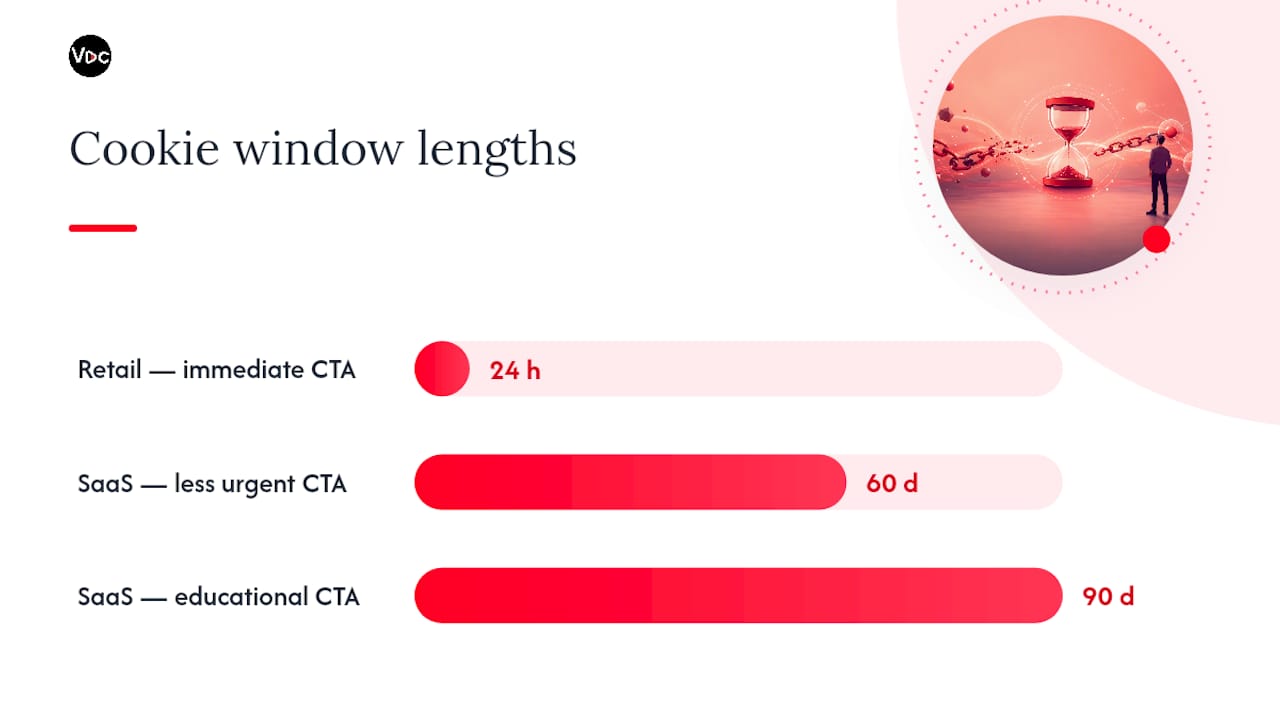
That gap changes how you should structure your calls to action. A 24 hour window means your CTA needs to push for an immediate decision, since a viewer who clicks today and buys next week won’t earn you anything. A 90 day window gives you room to be more educational and less urgent, since the sale can land whenever the viewer is ready.
Statistic Callout: Because most affiliate programs use last-click attribution, the creator whose link a viewer clicks last before checkout gets the commission, even if your video was the one that actually convinced them to buy. If a viewer watches your review, then clicks a different creator’s link three days later, you get nothing.
To protect against that kind of leakage:
- Use UTMs and sub-ids on every link so you can trace which video and which placement drove each click.
- Time your CTA to appear right before the moment of decision in the video, not buried at the very end after the viewer has already tuned out.
- Set up a managed redirect or branded shortlink so you can fix a dead or changed destination across dozens of videos without editing each one individually.
Maintaining a single link map, rather than scattering raw URLs across years of uploads, is what makes that last fix possible at scale.
What Are the Disclosure Rules for YouTube Affiliate Links?
Disclosure isn’t optional, and it isn’t complicated either. YouTube’s general approach allows affiliate links as long as they’re clearly disclosed and not misleading about the nature of the relationship. Put the disclosure where a viewer will actually see it before they click, not buried at the bottom of a wall of text.
In the description, place a line like this directly above your first link:
- “This description contains affiliate links. I earn a commission on qualifying purchases at no extra cost to you.”
In a pinned comment, keep it just as short:
- “Links below are affiliate links, which help support the channel.”
Spoken disclosure works best early in the video, right around the point where you first mention the product, rather than only in the outro where half your audience has already left. A simple “heads up, the link in the description is an affiliate link” takes three seconds and covers you.
Disclosure placed above the first link, visible without expanding anything, tends to build more trust and convert better than disclosure buried lower in the description, according to analysis of common YouTube affiliate practices. Rules can vary by country, so if you have a large audience in a specific market, it’s worth checking that region’s advertising standards for exact required wording.
What’s the Best Workflow to Scale Affiliate Revenue?
Random link-dropping doesn’t scale. A repeatable process does, and it starts with narrowing your offers, not widening them.
- Pick a focused set of programs that match what your audience actually searches for. A cooking channel promoting knife sets converts better than the same channel randomly pushing software deals.
- Build a single link map tracking every affiliate URL, its destination, its sub-id, and which video it lives in. A spreadsheet works fine at first; a dedicated link tracking approach keeps things sane once you pass fifty videos.
- Bulk tag where the platform allows it, and template your description structure so every upload follows the same format instead of reinventing the layout each time.
- Track EPC (earnings per click) by placement, using sub-id patterns tied to specific videos and positions, then double down on whichever format, whether that’s tutorials, unboxings, or comparison reviews, consistently produces the highest EPC.
Pro Tip: Run a monthly review of your link map, not just your view counts. A video with modest views but a high EPC often outperforms a viral video where nobody clicks through, and that’s the signal worth chasing.
Tutorials and product comparisons tend to outperform passive mentions because the viewer arrives already leaning toward a purchase decision. Unboxings work for similar reasons: the intent is already there before you say a word.
How Do You Fix Broken or Underperforming Affiliate Links?
Before assuming a link is dead, test it the way a real viewer would: incognito window, on mobile, fully logged out of every account. Links that work fine for you while logged into your own affiliate dashboard sometimes fail entirely for a stranger.
- If a link 404s, check whether the merchant restructured its site, which is the most common cause of link rot on older videos.
- If clicks are registering but sales aren’t, suspect attribution leakage, meaning a longer path to purchase let another site steal last-click credit.
- Audit your five oldest high-view videos quarterly and route dead links through a redirect instead of editing each description by hand.
- If a redirect fix doesn’t resolve it, contact the network or merchant directly. Sometimes the program itself has quietly ended.
Automation Makes Affiliate Link Hygiene Actually Sustainable
Most creators lose affiliate revenue not from bad offers but from neglect. A dead link nobody notices for six months, a CTA that’s identical across two hundred videos, a description template nobody’s touched since last year. That’s not a strategy problem. It’s a maintenance problem, and maintenance is exactly what faceless creators running high upload volumes struggle to keep up with.
Templated description structures and consistent thumbnail messaging make your CTAs repeatable across dozens of videos without rebuilding the format from scratch every time. Pairing that with a redirect manager means you can roll a link change out across your entire back catalog in minutes, not hours. The creators who treat their link map like an actual system, tested, tagged, and revisited monthly, are the ones whose affiliate income compounds instead of quietly decaying.
— Arnas
Voclify Helps You Turn More Views Into Affiliate Clicks
If your affiliate links are solid but your click-through rate isn’t, the problem might be upstream: your titles and thumbnails aren’t earning the click in the first place. Voclify builds titles, thumbnails, and scripts for faceless creators who need to publish consistently without spending hours on each asset.
Two examples worth trying: the AI title generator helps you write hooks that pull viewers in before they ever reach your affiliate CTA, and the thumbnail generator gives you a scroll-stopping visual to pair with it. Better CTR means more eyeballs on the video where your affiliate link actually lives, which is the whole point. If you’re rewriting the same disclosure and CTA lines into every script by hand, the script rewriter can tighten that flow so your spoken disclosure lands naturally instead of feeling bolted on. Start with the title generator on your next upload and see whether the click-through shift shows up in your affiliate numbers within a couple of weeks.
Sources
- YouTube Shopping affiliate program overview & eligibility — YouTube Help
- YouTube now lets creators tag Amazon products and earn commissions — TechCrunch
- Affiliate cookie (definition and examples) — GrowSurf glossary
- How To Make Affiliate Links: Benefits and Examples — Shopify
- Link rot and managed redirect strategies — Impact
FAQ
How Do I Get an Affiliate Link on YouTube?
Apply to a merchant program or affiliate network for a direct link, or check YouTube Studio’s Earn tab for a YouTube Shopping affiliate invitation if you’re eligible. Once approved, generate a deep link to the specific product and add a sub-id to track it.
How Many Views Do I Need to Make $10,000 a Month on YouTube?
There’s no fixed view count, since it depends entirely on your niche, commission rate, and click-through rate on your affiliate links rather than ad revenue alone. A smaller channel with a high-intent audience and strong EPC can outearn a much larger channel with weak conversion.
How Many Views Do You Need to Make $2,000 a Month on YouTube?
Again, this depends on your monetization mix, not views alone. A channel earning primarily through affiliate commissions can hit that number with far fewer views than one relying only on standard ad revenue, since commission per sale is usually worth far more than a single ad impression.
How Many Views Do You Need to Get Paid $1,000 on YouTube?
The honest answer is that view count alone doesn’t determine this. What matters more is your audience’s buying intent and your EPC, meaning a review channel with an engaged niche audience can reach meaningful commissions with a fraction of the views a general entertainment channel would need from ads.
Do I Have to Disclose Affiliate Links on YouTube?
Yes. Place a short disclosure above your first affiliate link in the description and mention it briefly in the video itself, ideally near where you first reference the product rather than only in the outro.
Recommended

Get more of this in your Google results
Add voclify.io as a preferred source and Google shows you more of our articles in Search and AI Mode.