
A YouTube automation channel is a faceless operation where AI and outsourced talent handle production while you keep editorial control over the final cut. The one thing that separates a channel that monetizes from one that gets flagged: you never let the pipeline run without a human reviewing the output before it publishes. Everything below covers the setup, the tools, the money math, and the policy lines you cannot cross.
TL;DR:
- Human oversight at every stage remains essential, especially for script accuracy and final quality control, to prevent demonetization risks.
- Successful faceless channels should produce 10 to 15 videos manually first, ensuring consistent retention and click-through metrics before scaling automation.
- Using AI tools for script writing, narration, and editing can reduce costs to around $1 to $3 per video, but review time is a vital, non-negotiable component.
- Maintaining unique content, licensing all assets, and avoiding repetitive templates are critical to staying in YouTube’s good graces and avoiding penalties.
- Key metrics like click-through rate, view duration, and RPM should be tested and optimized over multiple videos before expanding automation or additional channels.
What Is a YouTube Automation Channel, Really?
A YouTube automation channel runs on a five-stage pipeline: topic selection, script, narration, visuals, and publish. Each stage can be assisted by AI, but the channels that survive keep at least one human checkpoint between “AI generated this” and “this goes live.” Jellypod’s breakdown of the workflow makes the case plainly: automation is fine, mass-produced sameness is not.
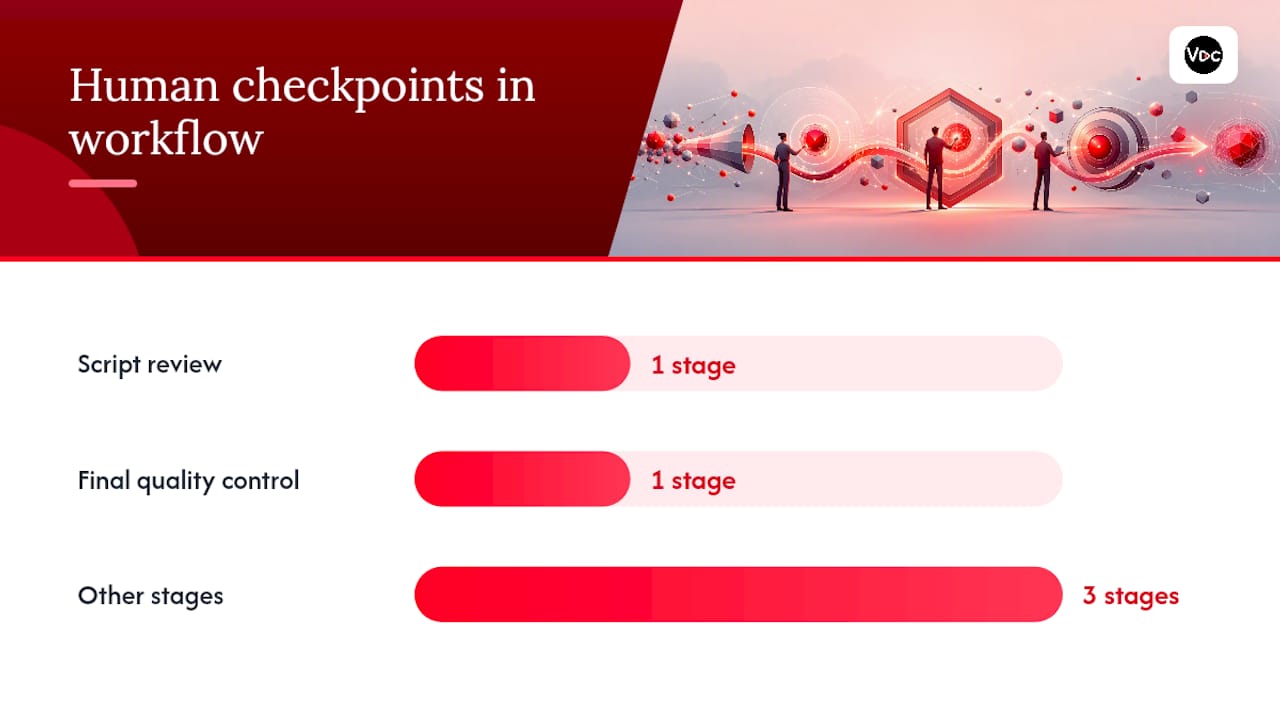
Two stages almost always need a human hand. Script review catches factual errors an LLM will confidently invent, and final quality control catches the mismatched clip or robotic pause that makes a video feel assembled rather than made. Everything else can lean heavily on tools.
There’s a real fork here between semi-automated and fully autonomous setups:
- Semi-automated (recommended): AI drafts, humans approve at one or two checkpoints before publish.
- Fully autonomous: scripts, voice, editing, and upload run with no human touch. Faster, but riskier, since guides published after 2026 enforcement sweeps point to editorial variation as the trait that separated surviving channels from demonetized ones.
Most creators who plan to scale past one channel land on semi-automated by year two, not because it’s trendy but because it’s the version that keeps getting monetized.
How Do You Set Up a Faceless Automation Channel?
Launching a faceless channel is less about tools and more about sequencing. Skip a step here and you’ll spend months producing content nobody searches for.
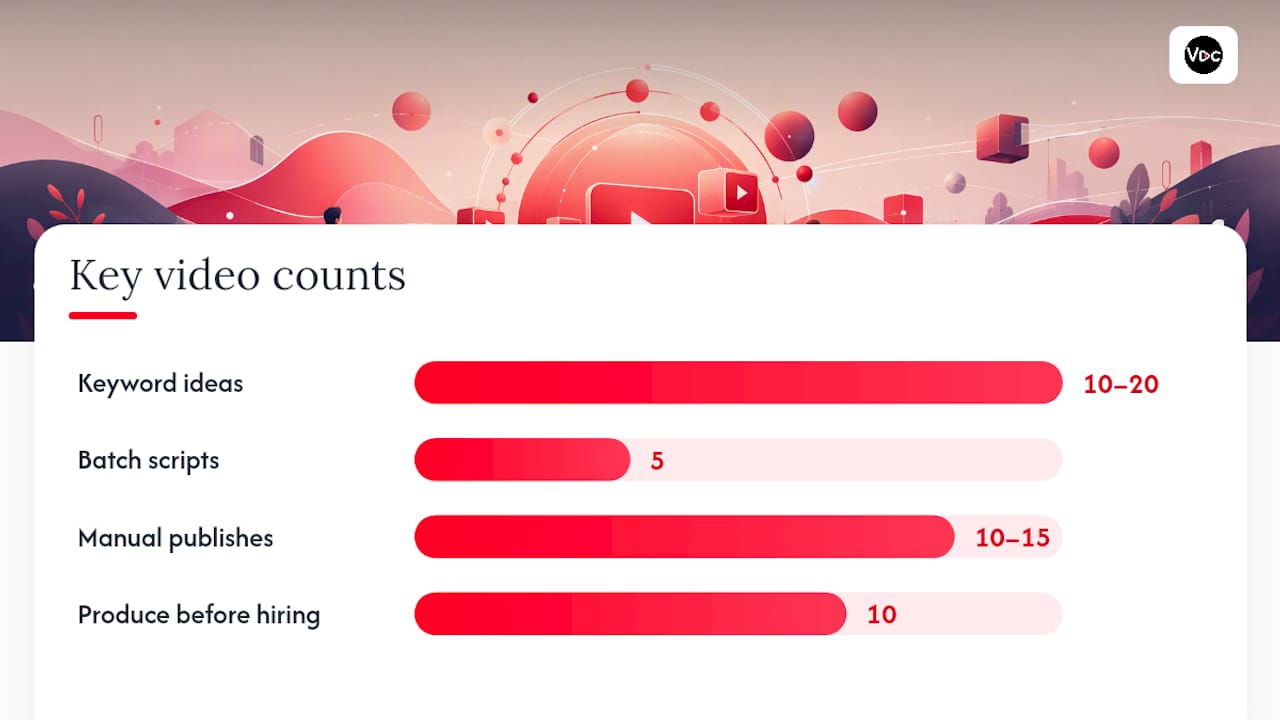
- Validate the niche before you script anything. Pull search volume and competitor density for 10 to 20 video ideas using keyword research. If every top result has a million subscribers, pick a narrower angle.
- Lock your branding decisions early. Choose a channel name, color palette, and thumbnail template you’ll reuse. Consistent packaging is what makes a channel look like a channel instead of a pile of random uploads.
- Write an SOP for every stage. Document exactly how a topic becomes a script, how a script becomes narration, and how narration becomes a finished video. This is what you’ll eventually hand to an editor or virtual assistant.
- Batch your production in weekly sprints. Script five videos on Monday, record narration Tuesday, edit Wednesday through Thursday, publish on a fixed schedule. Batching beats scrambling daily.
- Publish 10 to 15 videos manually before scaling. Review every single one yourself. This is your minimum viability test: if retention and click-through are flat across all 15, the niche or format needs fixing before you outsource a single task.
Practical guides on faceless channel production echo this sequence, with SOP-driven systems tied directly to CTR and average view duration as the levers that matter most in the first month.
Pro Tip: Don’t hire an editor or voice artist until you’ve personally produced at least ten videos. You need to know what “good” looks like before you can judge someone else’s output against it.
What Tools Actually Automate the Production Stack?
Every stage of the pipeline has a corresponding tool category, and knowing which one to plug in where saves you from buying software you won’t use.
- Script generation: LLMs draft fast, but every script needs a human editing pass for accuracy and voice. A tool like Voclify’s AI writing assistants can speed the draft stage while you keep final say.
- Video assembly: FFmpeg and MoviePy handle the technical editing, paired with stock clips from sources like Pexels and AI-generated thumbnails for packaging.
- Orchestration: Open-source agents like TubeAssistant chain script, TTS, clip sourcing, editing, and upload into one pipeline. Workflow tools like n8n paired with Telegram-based approval loops let you keep a human reviewer in the critical editorial path without adding daily grind.
Every upload path requires YouTube Data API v3 access and OAuth credentials, a setup step documented across GitHub automation repos that trips up more first-time builders than any content decision.
What’s the Realistic Earnings Math?
RPM, or revenue per thousand views, is the number that turns views into dollars. The formula is simple: (views ÷ 1,000) × RPM = estimated ad revenue. A finance-niche channel pulling monthly views at an $8 RPM nets proportionally more ad revenue; a general entertainment channel at the same view count with a lower RPM nets less.
Partner Program qualification has subscriber and watch time or Shorts view thresholds; channels may qualify faster via a Shorts-focused metric.
Startup costs for a lean AI-assisted stack run far below hiring freelancers directly. Cost comparisons in recent guides put freelancer-produced videos at $50 to $200 each, against roughly $1 to $3 per video using an AI-powered stack, though your own review time still counts as a real cost. Scaling to a second or third channel makes sense once one channel shows consistent positive RPM and retention, not before.
What Compliance Rules Should You Follow?
YouTube doesn’t ban automation. It penalizes content that looks mass-produced, repetitive, or deceptive. A batch of videos with identical structure, identical stock footage, and no unique framing reads as inauthentic to the algorithm and to reviewers.
Keep these rules of thumb in mind before you hit publish:
- Give every video a distinct storyline, not a template with swapped facts.
- Keep a human in the approval loop for every script and final cut.
- License every stock clip, image, and music track you use.
- Only flag content as altered/synthetic in Studio when it uses realistic synthetic voices or faces, per YouTube’s disclosure guidance.
Pro Tip: Run a three-point pre-publish checklist on every video: editorial pass for tone and accuracy, source verification for any claim or statistic, and a packaging check to confirm the thumbnail and title aren’t recycled from a prior upload.
Which Metrics Should You Track to Scale?
Five numbers matter more than any others: click-through rate, average view duration, audience retention, traffic source breakdown, and RPM. Everything else is noise until those five are healthy.
- Run thumbnail and title A/B tests on a two-week cadence, changing one variable at a time.
- Log each test in a simple template: hypothesis, variable changed, result, decision.
- Only scale automation or hire additional help once you see consistent lift across retention and RPM for at least three to four consecutive uploads, not a single lucky video.
A single viral hit tells you almost nothing about repeatability. Three or four solid weeks in a row tells you the format works, which is the actual signal to automate further.
Why Voclify Backs This Approach
Voclify offers a toolkit designed to help faceless creators produce content efficiently while maintaining editorial control.
The tools assist with scripts, titles, thumbnails, and branding consistency, helping to streamline the production process while keeping creators involved in decision-making.
What I’d Tell a Friend Starting Today
Automation is a multiplier on judgment, not a replacement for it. Test everything manually before you outsource or automate a step, and never let two videos in a row look identical. That variation is what keeps you monetized.
— Arnas
Try the Toolkit Built for This Exact Workflow
Voclify is the toolkit built to run the SOP this article just walked you through, script drafts, thumbnail generation, title testing, and brand consistency, all inside one workflow instead of five disconnected apps.
If you’re producing your first ten videos by hand, the Starter plan gives you the script and thumbnail tools to speed that process without losing the editorial checkpoints that keep a channel monetized. If you’d rather have hands-on guidance building the full pipeline, the YouTube Faceless Operator Program walks you through setup, outsourcing, and scaling with direct support. Check plan details and get started at Voclify.
Sources
For deeper technical builds, review TubeAssistant’s open-source pipeline and the Shorts Factory variation engine for anti-repetition patterns.
- metiu1/tube-assistant
- How to Start a YouTube Automation Channel in 2026 (Complete Guide)
- YouTube Automation: Complete Guide to Faceless Channels in 2026 | YouTube Tools Hub
FAQ
How Can I Start YouTube Automation?
Validate a niche with keyword research, write SOPs for each production stage, and publish 10 to 15 manually reviewed videos before automating or outsourcing anything. Tools like Voclify’s content planning suite can help once you know your format works.
Does YouTube Automation Really Make Money?
Yes, but the math depends on RPM and niche. RPM is the number that turns views into dollars; the formula is (views ÷ 1,000) × RPM = estimated ad revenue, so niche selection matters more than production speed.
How Many Views Do I Need to Make $10,000 a Month on YouTube?
At an RPM of $8, you’d need a significant number of views to reach your income goals. Lower-RPM niches would need proportionally more views to reach the same target.
How Many YouTube Views Do I Need to Make $2,000 a Month?
At an $8 RPM, monthly views multiply to estimated revenue using the formula (views ÷ 1,000) × RPM. Lower RPMs require proportionally more views to reach similar revenue levels.
Recommended

Get more of this in your Google results
Add voclify.io as a preferred source and Google shows you more of our articles in Search and AI Mode.