Paste a 1-2 line opener that leads with your main keyword and a clear viewer benefit, then drop in a modular template built from a hook, body, and links block. That single move fixes most weak descriptions I see. If your video runs past five minutes, adding timestamps is the next highest-impact edit you can make today. Copy-paste templates for every video type follow below.
TL;DR:
- Most creators fail to incorporate targeted keywords and benefits naturally into the first 125 characters, reducing search visibility.
- Adding chapters with searchable labels to videos longer than five minutes improves viewer retention and helps content surface in Google’s rich results.
- The most important links should be placed at the top of the description, with a clear, singular call to action and proper disclosure for monetized content.
- Researching keywords using YouTube analytics and Google Keyword Planner enhances description ranking; placement of primary keywords in the opening and chapters is crucial.
- Using templates and tools like AI script generators can streamline description creation, ensuring consistency in links, disclosures, and keyword usage across multiple videos.
YouTube Description Examples and Templates You Can Copy Right Now
Every strong description breaks into three reusable chunks: a hook that sells the click, a body that explains the value, and an infrastructure block of links and housekeeping that barely changes from video to video. Hootsuite’s structure calls these Hook, Body, and Infrastructure, and it’s the fastest mental model for building your own YouTube description templates without starting from a blank page every upload.
Here are seven templates you can adapt in minutes, each labeled for when to use it.
-
Standard video template. “[Keyword phrase] + what viewers get. In this video, you’ll learn [specific outcome]. [1-2 sentences of context]. Timestamps below. Links and resources: [website]. Subscribe for [content promise].” Use this as your default when a video doesn’t fit a more specific format.
-
Tutorial template. “Learn how to [specific skill] in [time frame], step by step. This tutorial covers [tool/method] so you can [outcome] even if you’re a beginner. Chapters below help you jump to the exact step you need.” Best for how-to content where viewers search for a specific fix.
-
Product review template. “Is [product name] worth it in 2026? I break down the pros, cons, and real performance so you can decide before you buy. Full specs and pricing in the description below.” Use when the video’s goal is a purchase decision, not a skill.
-
Shorts template. “[Hook line under 40 characters]. Full video here: [link].” Shorts descriptions stay short by design. One line, one link, done.
-
Interview or podcast template. “[Guest name] joins me to talk about [topic]. We cover [3 key points] and [one surprising takeaway]. Follow [guest name]: [link].” Naming the guest and topic up front helps both search and guest cross-promotion.
-
Sponsored video template. “This video is sponsored by [brand]. [1 sentence on what the brand does]. Get [offer] at [link]. #ad” Disclosure comes first, not buried at the bottom.
-
Channel description template. “[Channel name] helps [audience] [achieve outcome] through [content type]. New videos every [schedule]. Start here: [playlist link]. Socials: [Instagram/X links].” This lives on your channel’s About page, not individual videos, and rarely needs edits once set.
For faceless creators specifically, swap any “meet me” language for a value-first line, since there’s no on-camera personality to lean on: “This channel breaks down [niche topic] so you can [outcome] without the fluff. New uploads [schedule].” Channel-level blocks like socials and an About summary should stay identical across every video description, which is exactly the reusable infrastructure piece Hootsuite’s model describes.
Writing the First 125 Characters People Actually See
The first 125 characters function like a search snippet. That’s what shows up before someone taps “Show more,” and it’s what Google and YouTube surface in search results, so it needs to work harder than the rest of your YouTube video description combined.
Look at the difference a rewrite makes:
- Weak: “In this video I talk about some tips for editing videos faster.”
- Better: “5 video editing shortcuts that cut my render time in half.”
- Optimized: “Video editing tips for beginners: cut editing time in half with these 5 shortcuts.”
The optimized version front-loads a keyword phrase (“video editing tips for beginners”) and states a concrete benefit, which is what separates a forgettable opener from one that earns the click.
Before you publish, run your opener through this checklist:
- Does it contain your primary keyword phrase naturally?
- Does it state a specific benefit or outcome, not a vague promise?
- Does it avoid starting with a URL or a channel plug?
- Does it stay under the visible character limit so nothing important gets cut off?
Pro Tip: Write your opener last, after you’ve finished the rest of the description. It’s easier to summarize a value proposition once you’ve already spelled it out in the body.
Timestamps and Chapters: The Simplest SEO Win You’re Skipping
Any video longer than about five minutes should have chapters. It takes two minutes to add and pays off in both retention and discoverability, since chapter labels get indexed as searchable text rather than sitting invisibly inside your video.
The format is strict: your first timestamp must start at 0:00, and you need at least three timestamps listed in ascending order for YouTube to recognize them as chapters. A paste-ready block looks like this:
0:00 Intro
1:24 Setting up your camera
4:10 Recording your first take
9:32 Exporting and uploading
Name each chapter with a searchable phrase instead of a generic label. “How to set up OBS for recording” tells both viewers and search algorithms what’s inside that segment, while “Step 2” tells them nothing.
- Chapters help viewers skip to the part they need, which reduces early drop-off.
- Searchable chapter text can surface in Google’s video rich results.
- A clean chapter list makes your description look organized at a glance, which builds trust before anyone even presses play.
Links, CTAs, and Hashtags: Where They Go and Why
Put your most important link first. Viewers rarely scroll past the first one or two, so lead with whatever you most want clicked, and always write out the full https:// URL rather than a bare domain, since YouTube won’t auto-link a partial address.
A useful priority order: your own site or lead magnet, then your most relevant product or affiliate link, then social profiles, then anything secondary. Pick one call to action per description. Two competing CTAs split attention and typically convert worse than a single clear ask like “Grab the free template” or “Subscribe for weekly tutorials.”
If a link earns you money, disclose it plainly: “This description contains affiliate links. If you buy through them, I may earn a small commission at no extra cost to you.” That single sentence covers most disclosure requirements and reads as honest rather than defensive.
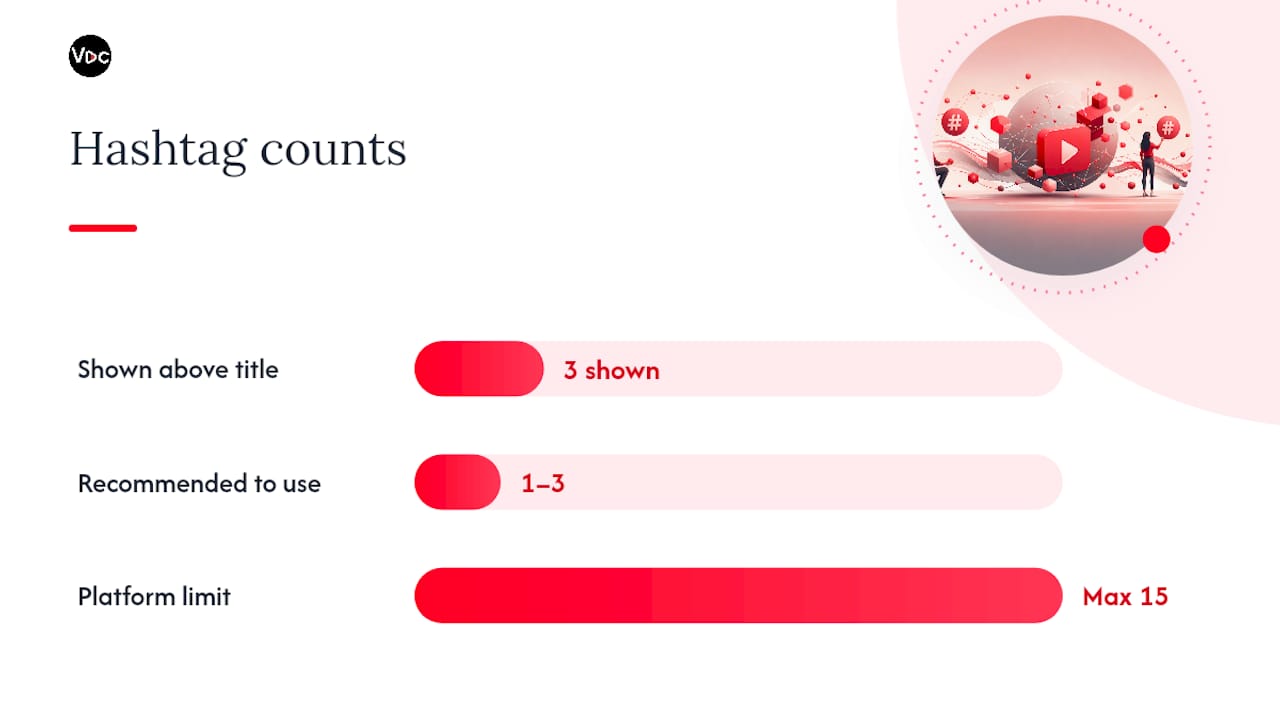
Hashtags belong at the very bottom of the description, and YouTube displays the first three above your title. Stick to one to three that are directly relevant to the video’s topic.
- Never exceed 15 hashtags total, since YouTube disregards all of them once you cross that limit.
- Reuse a small set of channel-level hashtags rather than inventing new ones every upload.
- Skip generic tags like #youtube or #video. They’re too broad to help anyone find you.
Pro Tip: Keep your affiliate disclosure and hashtag block in a saved text file so you’re never retyping boilerplate on upload day.
How to Research Keywords for a YouTube Description That Ranks
Skip the guesswork and start with YouTube’s own data. The Research tab in YouTube Analytics shows you what viewers are actually searching for, and Google Ads Keyword Planner adds search volume context from outside the platform. Both tools exist specifically to help you match your content to real audience language instead of terms you assume people use.
YouTube Help also recommends checking “How viewers find your video” in Analytics, since that report often surfaces phrasing you wouldn’t have thought to target.
Once you’ve got a shortlist, placement matters as much as selection:
- Put your primary keyword phrase in the first sentence of the opener.
- Work one or two supporting phrases naturally into the next two or three lines.
- Reuse those same phrases inside chapter titles where they fit, since that’s free additional indexing.
The workflow itself is short: research your terms, pick one primary phrase plus two supporting phrases, then slot them into the opener, the summary paragraph, and your chapter labels. Avoid stacking keywords into an unreadable list. YouTube Help specifically warns against keyword dumping, since natural language that actually explains value outperforms a wall of search terms and won’t get flagged as low quality.
Real Descriptions in Action, Broken Down by Video Type
Seeing a finished, annotated example makes the templates click faster than any explanation. Here’s how five different formats come together.
-
Tutorial. Opener: “Learn how to edit talking-head videos in DaVinci Resolve, step by step.” Body explains the software and skill level. Chapters run six deep with searchable labels like “Color correcting skin tones.” Links block leads with a free project file, then a Patreon. One hashtag: #DaVinciResolve.
-
Product review. Opener: “Is the [product] worth $200 in 2026? Full breakdown inside.” Body covers three pros, two cons, and a verdict. No chapters needed under five minutes, but a “Buy here” affiliate link sits first, followed by the disclosure sentence required for that link.
-
YouTube Shorts. Opener and only line: “This one editing trick doubled my watch time. Full tutorial: [link].” No chapters, no hashtag block beyond one or two. The single link does all the work.
-
Interview or podcast. Opener names the guest and topic directly: “[Guest] on building a seven-figure faceless channel from zero.” Chapters mark each major topic shift. Links block features the guest’s site above the host’s own.
-
Faceless channel description. “This channel turns [niche topic] into short, practical breakdowns, no face required. New videos [schedule]. Start with our most-watched playlist: [link].” This example matches the OutlierKit template model, which notes that channel-level descriptions should front-load value over personality when there’s no on-camera host to build rapport.
Each example follows the same skeleton, hook, body, infrastructure, but the tone and link order shift based on what the viewer actually needs from that specific video.
What Most Creators Get Wrong About Descriptions
Most creators treat the description as an afterthought they type in thirty seconds before hitting publish. That’s backwards. The description is the only piece of on-page copy YouTube and Google can fully read and index, which makes it more valuable per word than almost anything else on your upload screen.
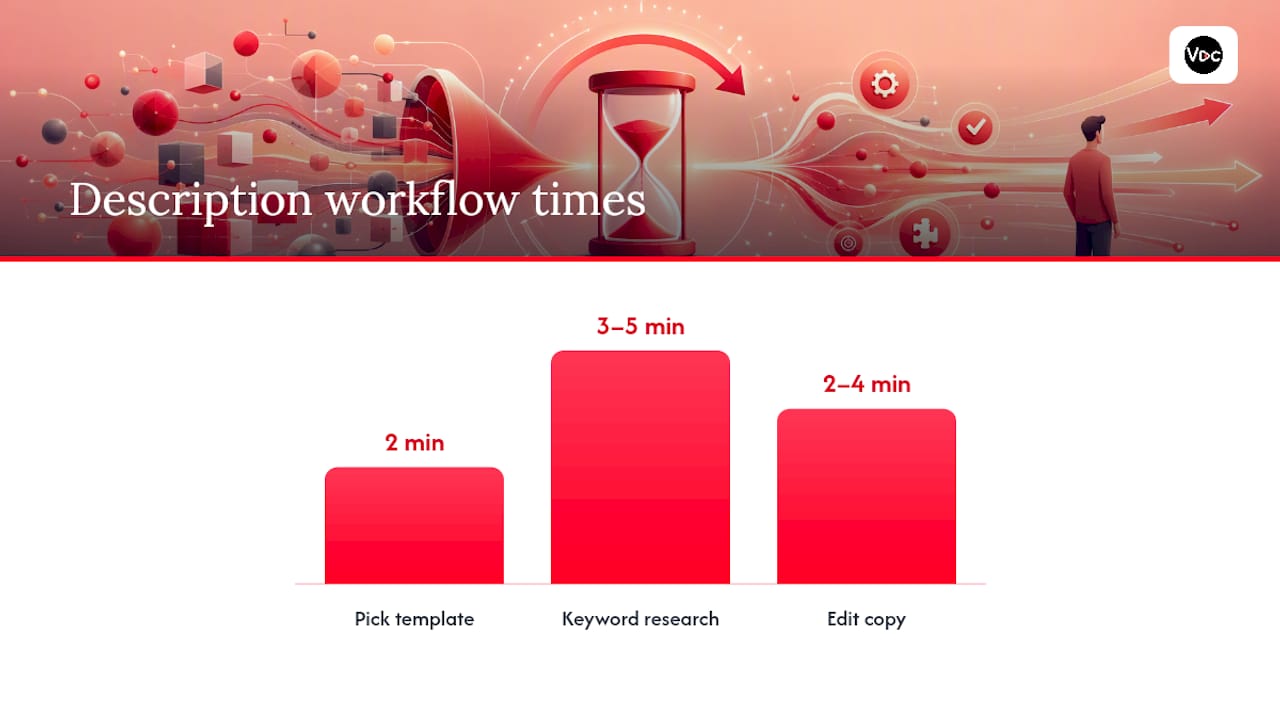
My workflow runs three steps: pick a template based on video type (2 minutes), do a quick keyword sniff using the Research tab or Keyword Planner (3 to 5 minutes), then edit the final copy to sound like a person, not a search query (2 to 4 minutes). Under 10 minutes total, every time.
The bigger mistake I see, especially among faceless creators, is rewriting the entire infrastructure block every upload. Your links, socials, and disclosure text should barely change. Lock those once, and you’ll spend your editing time where it actually matters: the hook.
Pro Tip: Save your infrastructure block as a channel-wide template inside whatever tool you draft in, so every new description starts half-finished.
— Arnas
Let Voclify Handle the Repetitive Part of Descriptions
Writing a strong opener and hunting for the right keyword phrase eats time you’d rather spend editing footage. Voclify’s AI YouTube Script Generator for faceless channels pulls your video’s topic and outputs a description draft alongside your script, so the hook, body, and keyword placement arrive already structured instead of built from scratch.
A typical workflow looks like this: generate your script and title with Voclify, let the description draft pull from that same script so the language stays consistent, then swap in your chapter timestamps once you’ve finished editing. Pair it with the AI YouTube Title Generator so your title and description opener reinforce the same keyword instead of fighting each other for attention. The platform has supported many creators building faceless channels, some of which have grown into channels with large combined subscriber counts.
If you’re publishing multiple videos a week, visit the script generator and try drafting your next description in the same pass as your script.
Sources
- Tips for video descriptions - YouTube Help
- How to write YouTube descriptions that rank and convert - Hootsuite
- YouTube Description Template (SEO-Optimized for 2026) | OutlierKit Resources
- How to Write a YouTube Description That Ranks and Converts - Alan Spicer
Recommended

Get more of this in your Google results
Add voclify.io as a preferred source and Google shows you more of our articles in Search and AI Mode.


